

For employers searching how to calculate cost-per-hire Savannah businesses can use, the starting point is their own recruiting records, not a national benchmark. Hiring expenses may be spread across job advertising, referral bonuses, recruiter time, and hiring-manager hours. A company-wide average can look tidy while hiding which roles or sourcing channels account for more spending.
A consistent method makes the calculation easier to use. Gather internal and external recruiting costs, then compare similar roles, time periods, and channels. National figures can offer context, but they can’t show exactly what hiring costs look like for your business in Savannah.
This guide explains how to calculate cost-per-hire, which expenses to include, and how to interpret the result for local hiring. You’ll also learn how to compare recruiting channels and use a repeatable process to understand where your budget is going. Treat local job advertising as one trackable part of your recruitment mix, alongside the other sources you use.
Key Takeaways
- Calculate cost-per-hire consistently by setting clear cost rules and counting completed hires in the same period.
- Separate internal recruiting expenses from external ones so the calculation reflects more than advertising fees.
- Compare similar roles and sourcing channels using the same measurement period, attribution rules, and cost categories.
- Use a spreadsheet to organize each expense by role, source, category, amount, period, and hire.
- Test one recruiting change at a time, and track job-ad costs separately from the hires and outcomes attributed to each channel.
What cost-per-hire measures, and why Savannah employers track it
Cost-per-hire is the recruiting expense associated with each completed hire during a defined period. Add the recruiting costs included in your measurement, then divide by the number of people hired in that same period. The result is an average. It helps your team understand recruiting spend per hire, but it isn’t the full cost or value of any individual employee.
For a Savannah employer, this measure can help show how spending varies across locations, roles, and sourcing channels. An overall figure is a useful starting point, but it can conceal differences. Break out the data to see where spending is concentrated and decide what needs a closer look.
What does cost-per-hire tell a hiring team?
Cost-per-hire gives your hiring team a baseline for recruiting spend per completed hire. It can support budget discussions and help you track changes over time, as long as you apply the same cost rules and measurement period consistently. A clear definition also makes the metric easier to explain across HR, finance, and department leaders.
Cost-per-hire is the average recruiting spend for completed hires in a defined period: included recruiting costs divided by the number of hires.
The figure doesn’t tell you whether candidates were a good match, performed well, or stayed with the company. It also isn’t the same as the cost of a bad hire, which concerns the wider impact of a hiring decision that doesn’t work out. Keep these questions separate: cost-per-hire describes recruiting spend, while candidate quality and retention need their own measures.
Cost-per-hire also differs from a recruitment budget. A budget sets planned spending; cost-per-hire summarizes actual included spending against completed hires. For employers learning how to calculate cost-per-hire Savannah teams can use, that distinction keeps the figure in perspective: it’s a management tool, not a verdict on hiring success.
Why a Savannah-wide average can hide useful detail
Hiring needs vary by role. Filling a logistics position may require different outreach and screening from recruiting for a hospitality, healthcare, or professional role. If your company hires across several functions or locations, combining every expense and hire into one average can hide those differences.
A lower company-wide average, for example, might reflect several straightforward hires even while a particular role or channel requires more recruiting effort. A higher average might reflect a small number of specialist hires rather than a problem across the whole hiring program. Compare similar roles and hiring efforts before deciding what a result means.
Local context can help explain shifts in recruiting conditions and hiring needs, but it doesn’t provide a cost-per-hire figure for your business. The 2026 Savannah job market outlook offers broader context for employers planning recruitment in the area. Use it alongside your own records, then examine costs by role, location, or channel to make comparisons more useful.
Cost-per-Hire: Formula and Costs to Include
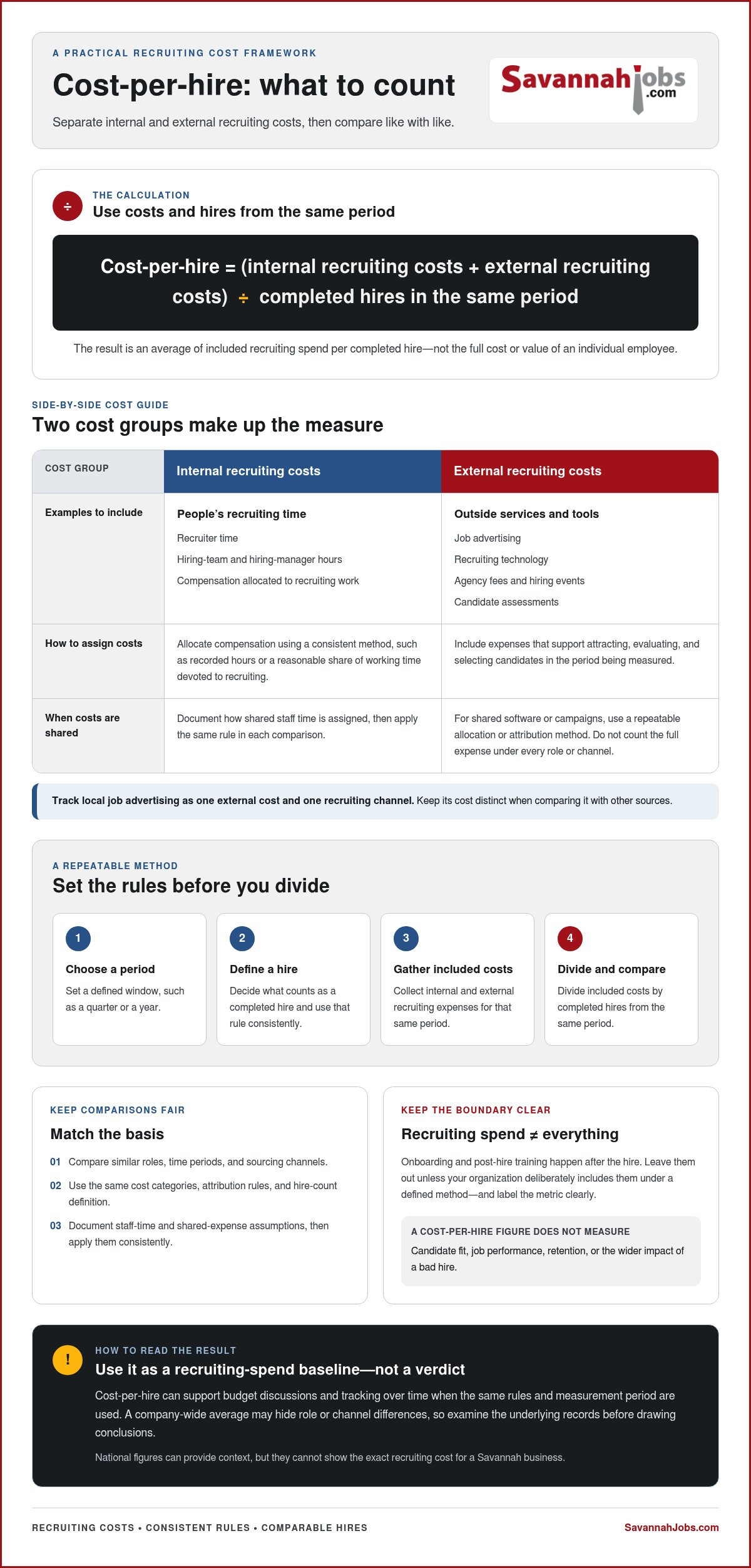
Before gathering expenses, decide what the metric should measure. Choose a period, such as a quarter or a year, and count the completed hires made during that same period. Define what counts as a completed hire and use that rule each time you calculate. Matching the dates, costs, and hire count helps prevent misleading comparisons.
Cost-per-hire = (internal recruiting costs + external recruiting costs) ÷ completed hires in the same period.
Consistency matters more than false precision. You don’t need to estimate every minute perfectly, but you should document how you assign staff time and shared expenses, then apply those rules consistently. If hiring managers record time in broad intervals rather than minute by minute, use the same approach for every role in the comparison.
Which internal and external expenses belong in the calculation?
Include expenses that support attracting, evaluating, and selecting candidates. Internal costs can include recruiter and hiring-team time, with compensation allocated through a consistent method, such as recorded hours or a reasonable share of working time devoted to recruiting. The U.S. Bureau of Labor Statistics provides data on employer costs for employee compensation, including wages, salaries, and benefits, which can inform your staff-cost estimates.
External costs may include job advertising, recruiting technology, agency fees, hiring events, and candidate assessments, when those expenses apply to the period and hires you’re measuring. A local job advertisement belongs in external recruiting spend when you’re tracking that channel. A recruitment advertising strategy guide can also help you plan how local advertising fits into your channel mix.
Shared expenses need a clear allocation rule. If one software subscription supports several departments, assign a documented portion to each using a consistent measure, such as usage or the number of recruiting activities supported. If one campaign advertises several roles, divide or attribute its cost using a repeatable method. Record the allocation so the full expense isn’t counted under every role or channel.
Set a clear boundary around recruiting costs
Keep the calculation focused on recruiting. Onboarding and post-hire training happen after the hire, so leave them out unless your organization has a defined method that deliberately includes them. If you include them, label the metric clearly and use the same boundary in every comparison. Otherwise, a figure called cost-per-hire may combine different types of spending from one period to the next.
Vacancy costs and lost productivity also belong outside the recruiting-cost total. They can be useful measures, but blending them into cost-per-hire makes it harder to understand what recruiting itself costs. Track them separately rather than expanding the formula without making that change clear.
For a Savannah employer, a repeatable spreadsheet can capture the period, role, expense category, amount, allocation rule, and associated channel. Use the same fields and definitions in each review. To track local job advertising as a distinct recruiting channel, include a Savannah-focused job posting in your external spend and compare it with your own hiring records.
How to interpret cost-per-hire across Savannah roles and recruiting channels
A cost-per-hire figure becomes useful when you compare similar hiring efforts. For a fair comparison, keep the role family, measurement period, included cost rules, and channel attribution consistent. If one result includes allocated hiring-manager time and another leaves it out, the difference may reflect the calculation method rather than a real change in recruiting spend.
Compare similar hiring efforts, not unlike roles
Separate recurring, high-volume hiring from specialist or leadership searches. A process used to fill similar frontline positions repeatedly may not be comparable to a search involving a narrower candidate pool or more assessment steps. Role mix changes the meaning of an average: a figure shaped by frequent, repeatable hires won’t describe a period dominated by specialist searches.
Use the same time window for each comparison, and note whether shared internal costs are allocated. A simple table can make the comparison rules visible:
| Role family | Recruiting channel | Completed hires | Total recruiting costs | Cost-per-hire average |
|---|---|---|---|---|
| Recurring, high-volume role | Enter source | Enter count | Enter allocated total | Total costs ÷ hires |
| Specialist or leadership role | Enter source | Enter count | Enter allocated total | Total costs ÷ hires |
| Same role family, comparison period | Enter source | Enter count | Enter allocated total | Total costs ÷ hires |
For channel comparisons, use a separate row for each source and assign hires using the same attribution rule each time. If candidates encounter multiple sources, document whether you credit the first source, the source that prompted the application, or another consistent method. The goal isn’t to make every comparison perfect; it’s to make your approach clear and repeatable.
Read a high or low result with context
A higher figure isn’t automatically a warning, and a lower one doesn’t prove that the process is efficient or successful. First check whether the role mix changed, the channel share shifted, or costs were captured differently. Then review applicant fit, completed hires, and relevant hiring outcomes alongside spend. Cost-per-hire measures cost, not candidate quality.
National or broad industry benchmarks can provide directional context, but they aren’t automatic targets for a Savannah employer. Definitions, role mix, hiring volume, and local conditions may differ. Before changing a channel or process, review the underlying records: role, period, attributed source, allocated internal effort, completed hires, and the outcome measures your team tracks. This can help distinguish a genuine channel pattern from a one-period fluctuation.
For employers learning how to calculate cost-per-hire Savannah teams can act on, compare like with like and investigate what sits behind the average before making a change.
Process for Calculating Cost-per-Hire in Savannah
A straightforward tracking routine makes cost-per-hire easier to calculate and explain. You don’t need complex software to begin. A spreadsheet, consistent source labels, and one person responsible for keeping records current can give your Savannah hiring team a repeatable process.
Build a simple cost-per-hire tracking sheet
Start with one spreadsheet row per expense or recruiting activity. Include fields for role, source, expense category, amount, measurement period, and associated hire. Assign one person to enter or collect expenses regularly, such as during a monthly finance or recruiting review. Add a short methodology note stating which costs count, how shared expenses are allocated, and how hires and sources are defined.
Use the same source labels throughout the sheet. For example, distinguish job advertising, referrals, agencies, recruiting events, and other channels. If a candidate encounters multiple sources, record each known touchpoint, then apply one attribution rule when connecting a completed hire to a channel. You might credit the source that prompted the application. Don’t credit the same hire fully to multiple sources in a channel comparison unless your reporting method explicitly accounts for that.
Calculate, check, and report the result
- Set the period and scope. Choose the dates and role group you’re measuring, then apply the same cost rules throughout.
- Gather eligible expenses. Collect recruiting costs tied to that period, including consistently allocated internal time and external expenses.
- Record hires and source attribution. Count completed hires using your stated rule, and assign channels consistently when candidates encountered more than one.
- Sum and divide. Add eligible costs for the period and divide by the completed hires made during that same period.
- Review the inputs. Check for missing invoices, duplicate expenses, inconsistent allocations, and a hire count that doesn’t match your records.
- Report with context. State the period, role group, cost-inclusion rules, and any shared-cost allocation method beside the result.
Decide in advance how to handle cancelled openings and incomplete hires. Costs already incurred for a cancelled opening may remain in the period’s recruiting spend, while an incomplete hire may not meet your definition of a completed hire. Document your approach and apply it consistently rather than changing the rules to suit a particular result.
Fictional example: Suppose a Savannah employer records $6,000 in eligible recruiting costs for a quarter and completes four hires in the defined role group. The calculation is $6,000 divided by four, or $1,500 per hire. These figures are illustrative only. The result is useful because its period, cost scope, and hire count are clear, not because the example sets a target for other employers.
When you’re ready to track local advertising as a distinct source, post a job on SavannahJobs.com and record the posting in your recruitment channel data.
Turn Savannah cost-per-hire findings into a practical hiring decision
Use a cost-per-hire result to guide a focused test, not as a verdict on your entire recruitment program. Look for one specific question in the data. Are you spending more on a particular channel? Is one step taking extra hiring-team time? Choose one change to investigate, then compare results using the same role group, period, cost rules, and source attribution.
Use the metric to guide a measured channel test
Set a baseline before changing a job posting, promotion, or sourcing mix. Record the current channel’s recruiting costs, attributable applicants, completed hires, and relevant outcomes. Then make one change at a time. If you adjust the posting and shift budget to another source simultaneously, it may be difficult to tell which change influenced the results.
Use the same attribution method throughout the test, especially when candidates encounter multiple channels. Track each source consistently and distinguish applicants from completed hires. A source may attract applications without contributing to a hire, while a hire may have interacted with more than one channel. Record how you assign credit rather than treating every touchpoint as a separate hire.
Review cost alongside role fit and the outcomes your team considers important, such as whether a hire meets the role’s requirements or remains with the organization over a defined period. Cost-per-hire doesn’t measure those results by itself. A lower figure isn’t automatically better if it comes with weaker outcomes, and a higher figure may warrant investigation rather than an immediate cut. Give the test enough time to collect comparable information, and note changes in hiring needs that could affect the comparison.
For a Savannah employer deciding how to use how to calculate cost-per-hire Savannah hiring teams can apply, a written test plan keeps the next step grounded in evidence. Define the role, channel, change, comparison period, and measures before reviewing results. A Savannah job posting guide can also help employers plan local recruitment advertising as part of their channel mix.
Include local job advertising in the next hiring plan
A SavannahJobs.com 30-day job posting gives employers a local self-service advertising option for a Savannah opening. Include its advertising cost in external recruiting spend, then track the source and any hires attributed to it separately. Review those records alongside applicant fit and other hiring outcomes. SavannahJobs.com provides recruitment advertising, not staffing or placement services.
Featured job and featured employer upgrades are optional visibility choices. If you test one, record it as a separate expense and define how you’ll evaluate it before the posting begins. This keeps the comparison clear and helps distinguish the effect of the upgrade from other changes in your recruitment mix.
Once your measurement plan is set, post a job in Savannah and include the advertising channel in your tracking from the start.
Make your next hiring decision with confidence
Use your cost-per-hire measure beyond a single review. Choose a regular point in your hiring calendar to revisit the results, check whether your tracking rules still fit, and agree on one question to investigate next. A steady process gives Savannah hiring teams a clearer basis for planning recruitment spend and discussing channel choices with department and finance leaders.
As you refine how to calculate cost-per-hire Savannah employers can use, keep local advertising visible as a trackable part of your recruitment mix. SavannahJobs.com is a Savannah-focused recruitment advertising platform and the digital recruitment portal for the Savannah Morning News, part of the USA TODAY Network. Its 30-day job postings and optional featured placements give employers ways to advertise local openings.
Ready to apply your measurement plan to your next opening? Post a job with SavannahJobs.com and track the channel alongside your other recruiting sources. Clear records can help your team make more confident decisions for Savannah’s next hiring cycle.
Frequently Asked Questions
Does cost-per-hire include onboarding expenses?
Usually, onboarding and post-hire training should sit outside cost-per-hire because they begin after the employee is hired. Keep costs tied to attracting, assessing, and selecting candidates in the recruiting account, and record orientation or role training separately. If your Savannah team chooses a broader accounting boundary, label the expanded measure clearly. Apply the same boundary to every period; otherwise, a change in the total may reflect classification rather than recruiting spend.
Should I include the time a hiring manager spends interviewing candidates?
Yes, you can include hiring-manager interview time as an internal recruiting expense if you estimate or allocate it consistently. A small Savannah employer might use a brief time estimate after each interview rather than ask managers to track every minute. Record the approach, such as time per interview or a share of recruiting hours, and keep it stable across review periods. The goal is a useful, explainable estimate, not identical tracking systems for every employer.
How often should a Savannah business review cost-per-hire?
Choose a review schedule that fits your hiring volume and planning cycle, then keep the periods comparable. If your business hires occasionally, wait until you have enough completed hires to interpret the average, and show the hire count beside it. With ongoing hiring, regular reviews can help you notice changes by role group or source. For how to calculate cost-per-hire Savannah employers can use over time, consistent review windows matter more than choosing a universal monthly or quarterly schedule.
Do cancelled job openings count as hires when calculating cost-per-hire?
No. The denominator should represent completed hires, not openings that were approved, posted, or later cancelled. Recruiting costs from a cancelled requisition still occurred, so decide how your organization will assign them within the accounting period. For example, you could keep them in overall recruiting spend or allocate them to the relevant role group. State your treatment in your methodology notes and use it consistently so readers can understand what the figure includes.
Can I compare cost-per-hire between two recruiting channels?
Yes, but first set a consistent attribution rule for candidates who see more than one source. Keep the hiring period and role scope comparable, then connect each channel’s spend to hires using that rule. For example, you might record multiple touchpoints but credit the source that prompted the application. Review candidate fit and later hiring outcomes, too. Spend per hire alone can’t show which channel is more effective for your hiring needs.
Is cost-per-hire the same as cost-per-applicant?
No. Cost-per-hire divides relevant recruiting spend by completed hires, while cost-per-applicant divides a defined spend total by applicants counted under your chosen rules. The first helps assess spending associated with filling positions; the second describes what it takes to attract applicants. A low applicant cost doesn’t show whether candidates meet job requirements or progress through selection. Keep the measures separately labeled, especially in a Savannah recruitment report.
What if my business makes very few hires in a year?
With few hires, one expense or additional hire can shift the average noticeably, so treat the figure as an indicator rather than a precise forecast. Report the period and completed-hire count beside it. Where appropriate, review several comparable periods together and note changes in role mix or recruiting methods. Don’t use a national benchmark to make a small sample look more stable. Rely on your own records and explain their limits.


