

What can a recruiting video show that a written job description can’t? A real workspace, a team’s routine, or a manager explaining what a typical shift looks like. That’s the value of using video in job descriptions: it gives candidates useful context, not a substitute for clear details. If you’re unsure what to film or worry that video means a costly, time-consuming production, you’re not alone.
A useful video doesn’t need a studio or polished script. It needs to answer practical questions honestly and help the right people picture the work. The written listing still needs to spell out responsibilities, qualifications, schedule, pay, and application steps.
This guide explains when video adds value, which formats can clarify a role, and how to make an authentic, accessible clip with captions and a manageable process. You’ll also learn how to pair it with a complete job description and assess meaningful candidate interest, not just views. For Savannah-area employers, we’ll consider how local job advertising can help distribute a finished listing.
Key Takeaways
- Use video to show the work environment and team perspective, while keeping essential role details in the written listing.
- Choose a format that answers a real candidate question, such as a day-in-the-life clip or an employee perspective on onboarding.
- When weighing whether using video in job descriptions works, distinguish richer candidate context from outcomes you’ll need to measure.
- Build a useful recruiting clip with a clear purpose, a relevant speaker, focused prompts, straightforward recording, and accessible publishing.
- Complete the job details, add supporting video, then distribute the listing locally through SavannahJobs.com.
Using video in job descriptions: what it adds, and what it cannot replace
A video-supported job description pairs written vacancy information with a recruiting video that adds relevant context. The video might show a work area, introduce the team, or let a manager explain a typical day. It gives candidates another way to understand the opportunity, but it should support the listing rather than carry details candidates need to find and compare roles.
Think of video as one part of the broader recruitment process. A clear clip can put a human voice and a real setting alongside the written details. A view or click alone, however, doesn’t show whether a candidate meets the qualifications. Use video to help people decide whether they want to learn more, then assess applicants against consistent, role-related criteria.
What candidates can learn from video
Show what words may leave unclear: the layout of an on-site workspace, how colleagues coordinate, or a representative task when it’s appropriate to film. A manager or employee can explain how a shift typically begins, who the role works with, or what onboarding covers. Keep examples realistic, protect private or sensitive information, and make sure every statement matches the written vacancy.
For instance, a Savannah-area employer hiring for a customer-facing role might show the kind of setting candidates would work in and have a team member describe the usual handoff between colleagues. That context helps candidates picture the environment. It shouldn’t promise a particular team experience or working condition unless the job details support that claim.
Why video does not replace the written job description
Candidates often need to scan or search for specifics before deciding whether to apply. Put pay, duties, qualifications, schedule, location, and application instructions in accessible text. This makes essential terms easier to review, compare, revisit, and share. Don’t bury a requirement in dialogue or expect someone to watch a clip to learn the role’s schedule or how to apply.
Make the video a choice, not a gate. Add accurate captions so viewers can follow the spoken information, and provide a text-based route to the same essential details for people who can’t or prefer not to watch. If the video adds information that affects a candidate’s understanding of the job, include it in the written listing too.
Before publishing, compare the listing and clip side by side. Check that the speaker describes the same responsibilities, location, schedule, and expectations as the text. If something changes, update both. The video can earn attention and make the opportunity feel more concrete; the written description gives candidates the details they need to decide whether applying makes sense.
Choose a video format that answers candidates’ real questions
The best format depends on what a candidate needs to picture or understand before applying. Start with a question, not a camera: “What will the workspace be like?” calls for different footage than “How does this team handle shift handoffs?” This keeps using video in job descriptions focused on practical role context instead of a general company sales pitch.
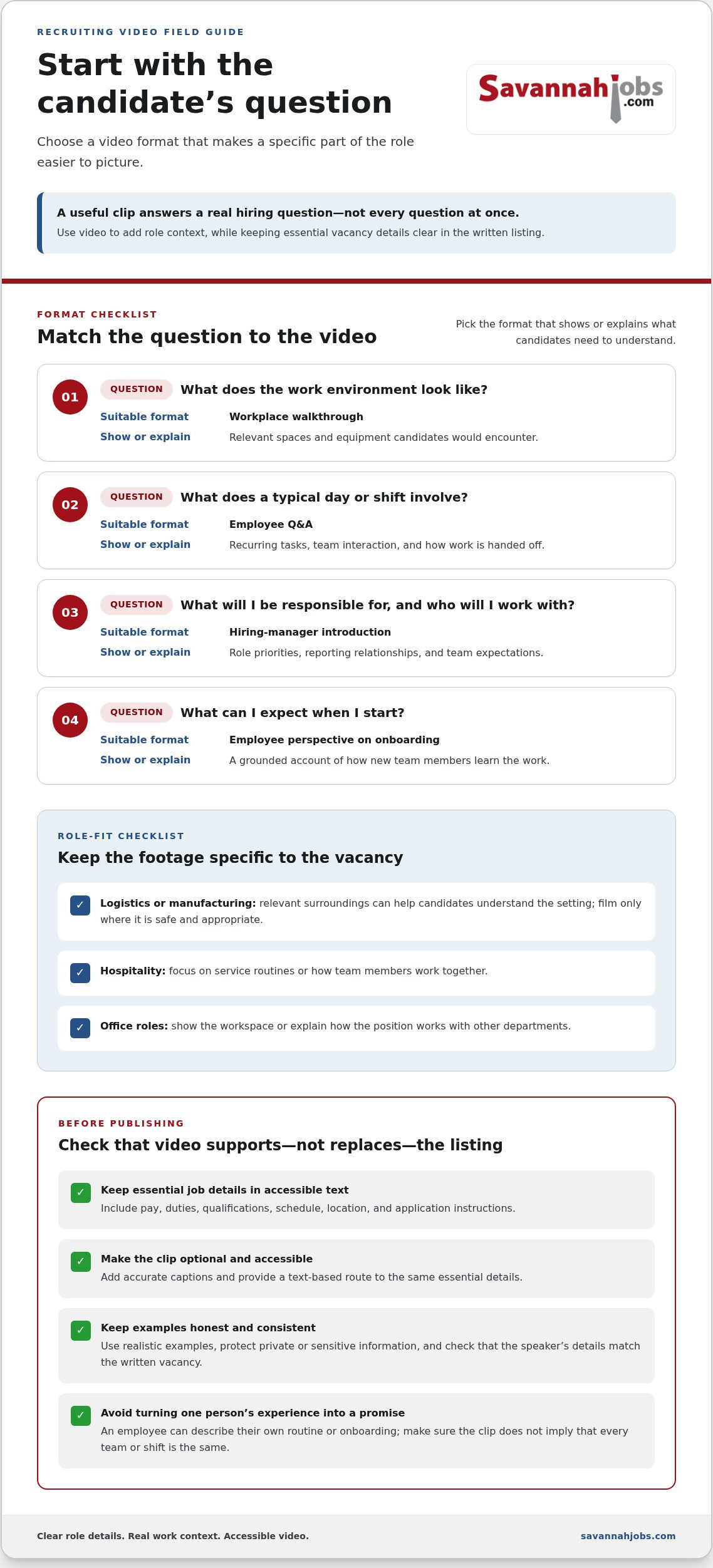
Candidate question: What does the work environment look like? Suitable format: Workplace walkthrough. Useful content: A brief view of relevant spaces and equipment candidates would encounter.
Candidate question: What does a typical day or shift involve? Suitable format: Employee Q&A. Useful content: Recurring tasks, team interaction, and how work is handed off.
Candidate question: What will I be responsible for, and who will I work with? Suitable format: Hiring-manager introduction. Useful content: Role priorities, reporting relationships, and team expectations.
Candidate question: What can I expect when I start? Suitable format: Employee perspective on onboarding. Useful content: A grounded account of how new team members learn the work.
Match the video to the hiring question
A walkthrough works when the physical setting is hard to convey in words. An employee Q&A is a better fit for recurring tasks, collaboration, or shift handoffs because a team member can describe how the work unfolds. Choose a hiring-manager introduction when candidates need clarity on priorities or reporting relationships. Give each format a specific purpose rather than asking one clip to answer every question.
Select a format for the role and audience
For a logistics or manufacturing vacancy in the Savannah area, relevant surroundings may help candidates understand the setting, but film only where it’s safe and appropriate. For hospitality roles, focus on service routines or team contact. An office role may benefit more from a workspace view or an explanation of how the position works with other departments.
Let the actual vacancy guide what appears on screen. An employee can speak to their own routines and onboarding experience, but avoid presenting one person’s experience as a promise about every team or shift. A manager should describe the responsibilities and working relationships for this opening, not rely on broad claims that could apply to any position.
Keep each clip specific enough to help a candidate decide whether the work sounds relevant. A hospitality employee describing a service handoff gives more useful context than a generic statement about teamwork. A manager outlining how a role supports a department helps set expectations better than a scripted company overview. Tailor the content to the position and make sure the examples fit the written vacancy.
Once the role details and supporting video are ready, distribute the vacancy through local Savannah job advertising to reach candidates in the area. Keep the video and listing aligned, and choose the format that makes the real job easier to understand.
Do video job descriptions outperform text-only postings? Compare evidence carefully
Video can give candidates richer context: a human introduction, a sense of the workplace, or a clearer picture of how a team works. Those are plausible benefits, but they don’t prove that a posting will attract more qualified applicants or lead to a successful hire. Results can vary with the role, audience, distribution, and usefulness of the video.
| Format | Strengths | Limitations | Best fit |
|---|---|---|---|
| Video | Shows people, surroundings, and work context. | Takes effort to produce and needs accessible alternatives; can obscure key facts if used alone. | Roles where a visual or personal explanation answers a real candidate question. |
| Text | Makes duties and requirements easy to scan, search, and compare. | May not convey workplace atmosphere or team interaction as clearly. | Essential vacancy details, including qualifications, schedule, and application instructions. |
| Video plus text | Pairs role context with detailed, reviewable information. | Requires the two formats to stay consistent. | Openings where candidates need both a clear description and a view of the work. |
Potential benefits and trade-offs of adding video
A concise clip can put a manager’s voice beside the role details, show surroundings that are hard to describe, or help candidates who prefer watching and listening. The trade-offs matter too: someone must plan and record it, accessibility takes attention, and a polished company story can still fail to answer a candidate’s question. Keep the written facts prominent. Video works best when it adds useful context without making applicants hunt for the basics.
For a Savannah employer, a relevant view of a work area or a team explaining a routine may help candidates picture the setting. But a video that makes broad claims about culture or advancement won’t establish what a particular opening offers. Tailor the content to the vacancy and the candidates you hope to reach.
How to interpret published performance claims
Stories Incorporated’s page cites CareerBuilder internal data reporting 12% more views for job postings with video and application rates that were 34% higher. These are reported figures, not a forecast for every employer. The claim doesn’t establish that the differences apply across roles, audiences, or current platforms, so don’t treat the percentages as a promised result for a Savannah vacancy.
Views and watch time tell you whether people noticed or watched the clip. They don’t show whether applicants meet job requirements, progress through selection, or succeed in the role. Measure those outcomes separately.
To assess your own results, compare equivalent postings over a defined period. Where possible, match role type, location, schedule, and distribution, then track applications and the proportion that meet stated requirements. A single posting can offer an initial signal, but it can’t settle whether using video in job descriptions improves hiring outcomes. Consider attention, applicant fit, and hiring progress together before deciding whether to keep using the format.
Create and publish a useful recruiting video in five practical steps
A useful recruiting video doesn’t need a large production crew. Focus on one candidate question, a speaker who knows the role, and a clear path to publishing the clip alongside complete written job details. These five steps take you from idea to accessible, practical content.
- Set one purpose. Choose the question the video should answer, such as what a typical shift involves or how the role works with the team. A single focus makes it easier to keep the clip concise and useful. If the written vacancy needs work too, use this job description writing guide to organize the essential details.
- Choose a speaker. Ask a hiring manager to explain responsibilities and priorities, or invite an employee with direct experience to discuss routines and collaboration. Get the speaker’s consent before recording and explain where the clip will be used. A knowledgeable, natural voice usually serves candidates better than a scripted spokesperson reading broad company claims.
- Plan a few prompts. Prepare three to five questions about the role, team, workplace, and realistic expectations. For example: “What does a typical shift include?” or “Who does this position work with most often?” Use plain language and let the speaker answer naturally. Prompts provide structure without turning the conversation into a sales pitch.
- Record clearly. A phone or basic camera can work if the sound is easy to hear and the image is steady. Choose a quiet location, face the speaker toward good light, and frame them at eye level. Check the recording before wrapping up. If names or technical terms are hard to understand, record that answer again while the speaker is available.
- Publish accessibly. Add accurate captions and review them for names, job-specific terms, and speech errors. Give the clip a descriptive title and a short explanation of what candidates will see. Provide a text alternative, such as a transcript, or include the same useful information in the written vacancy. Keep the full job description alongside the video. Test playback and controls so candidates can choose how to access the content.
Before publishing, check that the clip and listing describe the same role, schedule, and expectations. That final review prevents a helpful introduction from creating confusion. Using video in job descriptions works best as a manageable addition to clear vacancy information, not a replacement for it.
Once the written listing and supporting video are ready, advertise your opening to the Savannah-area workforce with a local job posting.
Use video alongside local job advertising to help candidates take the next step
A recruiting video is only one part of reaching candidates. Start with accurate job details, add supporting video where it can explain the role, then distribute the complete vacancy through channels suited to your hiring area. For employers in Savannah, local advertising can put a clear opportunity in front of people looking for work in the region. The video adds context; the listing gives candidates the information and instructions they need to act.
- Finish the job details. Check the duties, qualifications, schedule, location, pay information, and application instructions. Make the listing useful on its own so candidates don’t need to watch a video to understand the opportunity.
- Add supporting video. Use a relevant clip to answer a question about the work, team, or environment. Keep the video and written vacancy consistent, and make the clip accessible wherever it’s published.
- Distribute locally and review the response. A 30-day job posting on SavannahJobs.com gives employers a local advertising option for reaching candidates in the Savannah region. Featured job placement is an optional upgrade for added visibility, not a promise of applications or hires.
Measure whether the video is helping
Review available views or plays, completion, click-throughs, and applications as separate signals. A high view count may indicate attention, while application activity shows a different step in the process. Neither tells you on its own whether applicants match the role. Look at applicant relevance and the questions candidates ask, too. Repeated questions about an unclear schedule or responsibility may point to details the listing or video should explain more plainly.
For a useful comparison, review similar vacancies with and without video over a defined period. Note differences in role, timing, location, and distribution, since those factors can affect results. Treat the comparison as a practical guide for your next posting, not as proof that video alone caused a change.
Turn a finished job description into a local hiring step
SavannahJobs.com is a local job-advertising platform for employers in the Savannah area. A 30-day job posting can help distribute an opening locally, and featured job and featured employer upgrades offer added visibility options. The Savannah employer hiring guide outlines considerations for posting a role, while the recruitment advertising strategy guide offers a wider view of local promotion.
Keep the listing complete whether or not a candidate watches the video. Then choose distribution that fits the opening and your hiring goals. Using video in job descriptions can help candidates picture the work, while a local 30-day posting provides a practical next step for sharing the vacancy with Savannah-area job seekers. Explore local job advertising on SavannahJobs.com.
Make your next opening easier to picture
Start with one vacancy and one candidate question. A short, honest clip can help people picture the work, but the complete opportunity also needs to be easy to find and consider. Treat using video in job descriptions as a practical way to add context, then let clear job information and thoughtful follow-through guide your hiring process.
For Savannah employers, local visibility can bring the written opportunity to job seekers in the region. SavannahJobs.com offers employers 30-day job postings and optional featured job and featured employer upgrades. Choose the visibility option that fits your hiring plans, and assess the response based on relevant applications, not attention alone.
Post your opening on SavannahJobs.com and reach local job seekers. Give candidates a clear next step and move forward with confidence in your Savannah hiring search.
Frequently Asked Questions
Does a video replace the written job description?
No. Keep the written job description as the reliable reference candidates can search, save, and review quickly. Include the role’s responsibilities, qualifications, location, schedule, compensation information, and application instructions in text. For example, a candidate comparing openings on a phone should be able to scan the schedule without replaying a clip. Check that the video and listing describe the same position before sharing them.
How long should a video in a job description be?
There’s no single runtime that suits every role. Give the clip enough time to answer one candidate question, then remove greetings, repeated points, and unrelated company background. A manager explaining a reporting relationship may need less time than a walkthrough showing several work areas. Review whether viewers stay through the useful information, but don’t assume a particular duration will guarantee more applications.
Can a small employer create a recruiting video without professional equipment?
Yes. A phone or basic camera can produce a useful clip if candidates can hear the speaker and see the relevant details clearly. Before recording, test the setup by playing back a short sample; listen for background noise and check that the image is steady. Ask someone unfamiliar with the role to watch it and say what they learned. Fix unclear points before publishing instead of adding effects.
Should a job description video include captions?
Yes. Captions help candidates who are deaf or hard of hearing, as well as people watching in a quiet setting with the sound off. If you use automatic captions, review the full text and correct names, technical terms, and misheard phrases. Add a brief written description of the clip so its purpose is clear before playback. Candidates should still be able to understand the vacancy without watching it.
What should an employee say in a job description video?
Ask the employee to describe work they know firsthand, rather than make broad claims about the whole organization. For example, a Savannah-area employee could explain how a particular shift passes customer requests or work tasks to the next team. Let the speaker use their own words, and avoid promises about culture, advancement, or every employee’s experience unless those claims are accurate and relevant to the opening.
How can employers tell whether a job video is working?
Track video activity and hiring outcomes separately, then look for useful patterns. A short note in your applicant tracking process can record whether candidates understood the role or raised questions the clip was meant to answer. If applications increase but candidates misunderstand a core requirement, the video may need revision. Compare similar openings where possible, and consider whether changes in promotion or timing also influenced the response.
Is video useful for every kind of job opening?
No. Add video when it helps candidates understand something that’s difficult to picture from the listing alone, such as a specialized workspace, a team interaction, or a task in context. For a straightforward opening with familiar duties, concise text may do the job well. Before using video in job descriptions, identify a real candidate question it can answer. If there isn’t one, focus on making the written vacancy clear.


