

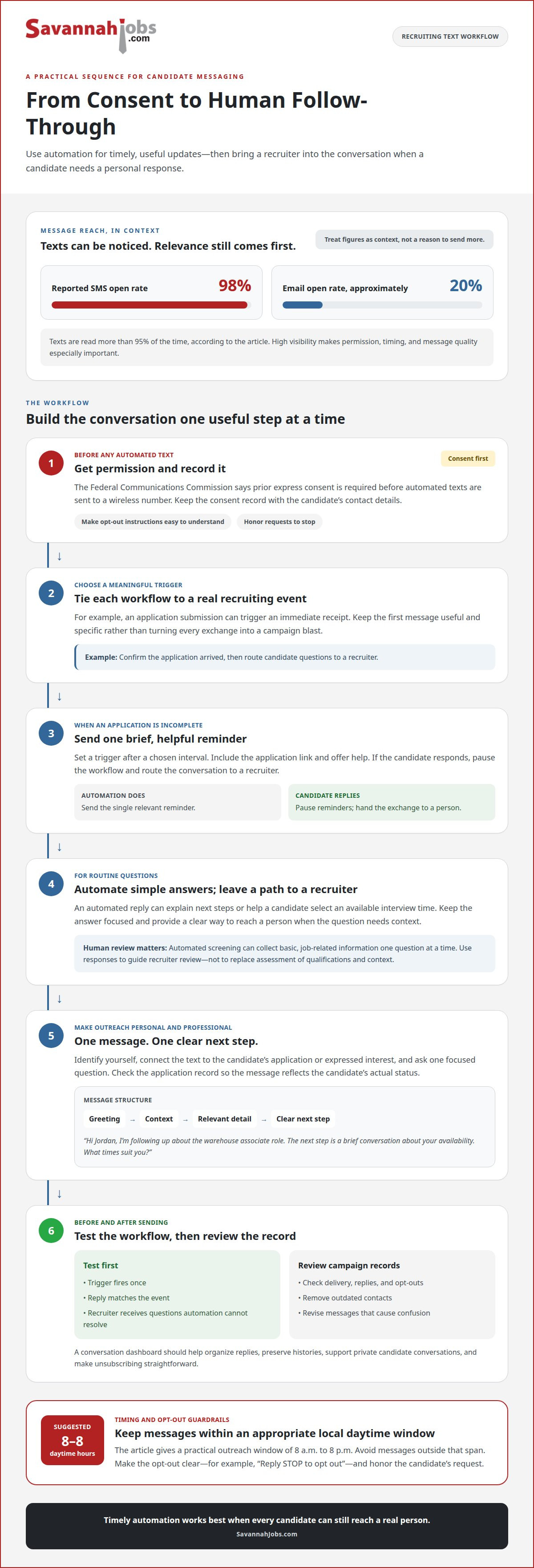
More recruiting texts don’t automatically lead to better candidate conversations. Using text messaging to recruit candidates works best when you get permission before sending automated texts and keep each message relevant, personal, and professional. The Federal Communications Commission says prior express consent is required before automated texts are sent to a wireless number.
A faster way to reach applicants can be useful, as long as each interaction feels personal rather than like a mass message. Automation can handle timely replies and simple follow-ups, while thoughtful details help candidates feel they’re speaking with a real employer.
Learn how to plan recruiting text conversations, automate useful messages, and tailor outreach to each candidate. We’ll also cover practical etiquette, including when to text and how to keep conversations focused, so you can build one-to-one relationships while keeping hiring communication organized.
Key Takeaways
- Get a candidate’s consent before sending automated recruiting texts, and keep outreach within appropriate daytime hours.
- Use automation for timely follow-ups and simple updates, while leaving room for recruiters to respond personally when needed.
- Make each message professional and relevant by addressing the candidate’s application, interests, or next step.
- Build a stronger local applicant pipeline by pairing thoughtful follow-up with a clear job posting on SavannahJobs.com.
Using a business texting app to manage recruiting conversations
A business texting app keeps candidate conversations and application follow-ups in one place. To use text messaging to recruit candidates effectively, start with a clear purpose: confirm receipt, share a scheduling option, or answer a question. Keep each message focused on one next step.
Get permission before texting, especially before sending automated messages. The Federal Communications Commission says prior express consent is required before automated texts are sent to a wireless number. Record consent with the candidate’s contact details and make the opt-out process easy to understand.
How does text message recruiting work? A recruiter uses a business number or texting platform to send an individual or group message, then manages replies in a conversation dashboard. From there, the recruiter can answer questions, arrange scheduling, and guide candidates through the application process.
Texting can help recruiters reach candidates promptly. The reported SMS open rate is 98%, compared with approximately 20% for email, and texts are read more than 95% of the time. Treat these figures as context, not a reason to send repeated messages; relevance matters more than volume.
Choose appropriate local daytime hours for outreach. A practical window is 8 a.m. to 8 p.m.; avoid messages outside that span. Include a clear opt-out instruction, such as “Reply STOP to opt out,” and honor a candidate’s request to stop receiving texts.
When choosing recruiting texting software, look for a browser-based dashboard that organizes replies, supports private candidate conversations, and makes unsubscribing straightforward. Check that recruiters can see conversation histories and coordinate scheduling without sending duplicate messages from separate accounts.
What recruiting text message templates get the best response? Use a brief, specific message tied to the candidate’s application: “Hi Jordan, thanks for applying for the clinic coordinator role. Are you available to discuss next steps?” A clear purpose and an easy way to reply keep the exchange simple.
What are the best practices for recruiting candidates by text? Get permission, identify the employer, keep messages professional, and send only useful updates during daytime hours. For example, share an interview time or ask one focused question, then respond personally to the candidate’s answer.
2. Using text recruiting software to automate messages
Start with a recruiting event, such as an application submission, and assign it one useful message. A talent acquisition workflow might send an immediate receipt, then route questions to a recruiter. This sequence makes the first response timely without making every exchange feel like a campaign blast.
For incomplete applications, set a trigger after a chosen interval. Send one brief reminder with the application link and an offer to help. If the candidate responds, pause the workflow and route the conversation to a recruiter. This handoff keeps follow-up relevant and prevents reminders after someone has re-engaged.
Automated replies can also answer routine questions about next steps. For example, a candidate who texts “interview” could receive instructions for selecting an available time. Keep the response focused, and give candidates a clear way to reach a person when their question needs context.
Campaigns work best when they have a defined audience and purpose. A recruiter might send a role update to applicants who expressed interest in that position, then record delivery, replies, and opt-outs. Review those records before the next send. Remove outdated contacts and revise messages that cause confusion.
Automated SMS screening can collect basic information before a recruiter reviews an application. Ask one clear, job-related question at a time, such as whether the candidate can meet a stated shift requirement. Use responses to guide human review, not replace an assessment of qualifications and context.
Before launching a workflow, test it with a sample contact. Confirm that the trigger fires once, the reply matches the event, and a recruiter receives questions automation cannot resolve. Choose software that supports conversation histories, workflow controls, and clear campaign records. For organizations integrating recruiting tools with broader enterprise systems, consulting IT service management specialists like Test Triangle can help ensure automated workflows operate reliably. These checks help teams manage talent engagement while preserving the personal follow-through candidates need.
3. Professional and personalized messages
A professional recruiting text sounds like a direct note, not a generic hiring alert. Start with the candidate’s name, identify yourself, and connect the message to a real action. For example: “Hi Maya, I’m Alex from the hiring team. Thanks for applying for our office coordinator role. Would Tuesday work for a short call?”
Personalization means using details relevant to the candidate, not just adding a first name to every template. Refer to the position they applied for, a stated shift preference, or a previous conversation. Before sending, review the application record to make sure the message reflects the candidate’s actual status.
How can recruiters personalize text messages and avoid being marked as spam? Send only messages related to a candidate’s application or expressed interest, and explain why you’re reaching out. Avoid repeated generic prompts, unexplained links, and requests for information already provided in the application.
Use a simple structure to draft messages: greeting, context, one useful detail, and a clear next step. For instance, “Hi Jordan, I’m following up about the warehouse associate role. The next step is a brief conversation about your availability. What times suit you?” This gives the candidate a specific action without crowding the message.
A recruiting platform can store approved templates, but recruiters should adapt them before sending. Replace broad phrases such as “We have an opportunity” with the actual job title and a relevant detail. A faster message isn’t better if it feels copied or doesn’t match the candidate’s hiring stage.
Keep each text concise and focused on one purpose. Candidates should be able to understand who’s contacting them, why, and what to do at a glance. If a topic needs a detailed explanation, use texting to arrange a call instead of compressing a complicated hiring update into one message.
After a candidate replies, address the point they raised. If they ask about interview timing, offer a clear scheduling option instead of sending another general prompt. This keeps the exchange personal while helping the hiring process move forward.
4. Building one-to-one relationships with new candidates
Each candidate’s experience should feel like a conversation, not a sequence of identical updates. After an application arrives, assign a recruiter to follow up, answer questions, and clarify the next step. A named contact gives job seekers someone to reply to if interview plans or availability change.
Use mobile messaging to make practical coordination easier. For example, offer two interview windows and ask which works for the candidate. Once they choose, confirm the time and explain who will meet them. This gives the candidate useful information without turning a short text into a lengthy explanation.
Templates can help an organization stay consistent, but they should leave room for details from the candidate’s application. A useful template includes the role, the sender’s name, and one relevant next step. Before sending, tailor those details and remove any prompt that no longer fits the person’s hiring stage.
One-to-one communication also means listening before sending another update. If a candidate can’t attend an interview, acknowledge the conflict and offer a new time. If they ask about the role, answer directly or arrange a conversation with someone who can. Relevant responses build trust through action.
Keep a clear record of each exchange so another recruiter can continue the conversation without asking job seekers to repeat themselves. Note the latest update, any agreed interview time, and how the candidate prefers to proceed. This handoff helps maintain continuity while keeping communication personal.
To connect with local job seekers, explore local hiring opportunities and give candidates a clear path to learn about your open role. A well-presented position can start the relationship; thoughtful follow-up helps carry it through the interview process.
SavannahJobs.com
SavannahJobs.com helps employers advertise open positions to the local Savannah workforce, giving your candidate outreach a clear place to begin. A 30-Day Job Posting can put a role in front of local job seekers, while Featured Job and Featured Employer upgrades offer additional visibility options.
When you’re ready to connect an organized recruiting process with a local job advertisement, SavannahJobs.com can help. A clear listing gives candidates useful role information before your personal follow-up begins. Texts can then support the conversation by sharing next steps and coordinating interviews.
For your next local hiring effort, contact SavannahJobs.com to discuss advertising your open position.
Make your next candidate conversation count
Set a clear goal for your next hiring message before sending it. Decide what the candidate should understand or do, then make the exchange easy to continue. This keeps communication useful at every stage, from initial interest to the next hiring decision.
Using text messaging to recruit candidates is most effective when each message supports a real relationship, rather than simply adding another touchpoint. Learn from candidates’ questions and replies, and use those insights to improve how your team welcomes applicants and explains what happens next.
For employers in Savannah, a strong recruiting process also needs a clear way for local job seekers to find open roles. Put that next step in motion and build your local hiring campaign with SavannahJobs.com.
Thoughtful outreach starts with one relevant message. Give your next candidate a clear reason to reply, then keep the conversation moving.
Frequently Asked Questions
Looking for more insights on how to use text messaging for recruiting?
Map candidate communication to hiring stages: application received, interview arranged, and decision shared. At each point, decide whether a text genuinely helps the candidate take action or understand what happens next. Record replies and opt-outs, then review where candidates need clearer information. This turns recruiting texts into a practical communication process, not just another channel for announcements.
Is Text Recruiting Software TCPA Compliant?
Not automatically. Compliance depends on how the software is configured and used. The Federal Communications Commission says prior express consent is required before automated texts are sent to a wireless number. A platform can support organized consent records and opt-outs, but those tools don’t replace sound messaging practices. Build consent, message purpose, and unsubscribe handling into the workflow before sending automated recruiting texts.
What is the average response rate for recruiting text messages?
There isn’t one response rate that applies to every recruiting campaign. Replies depend on whether candidates expect the message, recognize the employer, and can answer easily. Track delivered messages and replies for each campaign, distinguishing interview interest from opt-outs or questions. For example, compare follow-up performance by job role and message purpose to learn what prompts useful engagement.
What tools and platforms are used for SMS recruiting, and how much do they cost?
Recruiters may use a text recruiting platform with a browser-based dashboard to organize candidate conversations, send campaign messages, and automate routine replies. Costs vary by platform and pricing model, so compare the features your workflow needs, such as conversation management and automation. For specialized sectors managing automated communication and contact workflows, platforms like reireply.com offer insight into how multi-channel messaging systems operate. Consider how the platform records candidate replies and opt-outs, too. A small, clearly defined workflow can help identify essential features before adoption.
How do SMS recruiting tools compare with email and phone outreach?
Texting suits concise updates and simple actions, such as confirming interview availability. Email gives recruiters more room for detailed role information or documents, while a phone call allows a live conversation about questions that need discussion. Choose the channel based on the message, not habit. For example, text to coordinate a time, email the interview details, and call when a candidate wants a fuller conversation.
Do employers need candidate consent to send recruiting text messages in the United States?
For autodialed or prerecorded texts to a wireless number, the Federal Communications Commission requires oral or written consent. Get consent before sending automated recruiting texts, and keep the record connected to the candidate’s contact details. Make it clear how candidates can opt out, and stop further texts after an opt-out. These practices help employers manage recruiting outreach responsibly.


